The VMware Cloud Foundation deployment process is referred to as bring-up. You specify deployment information specific to your environment such as networks, hosts, license keys, and other information in the deployment parameter workbook and upload the file to the VMware Cloud Builder appliance to initiate bring-up of the management domain.
During bring-up, the management domain is created on the ESXi hosts specified in the deployment parameter workbook. The VMware Cloud Foundation software components are automatically deployed, configured, and licensed using the information provided. The deployment parameter workbook can be reused to deploy multiple VMware Cloud Foundation instances of the same version.
The following procedure describes how to perform bring-up of the management domain using the deployment parameter workbook. You can also perform bring-up using a custom JSON specification
In this blog, I’ll prepare VCF 5.0 bringup in a nested ESXi environment.
Software installed:
Cloud builder 5.0.0
ESXi 8.0 update 1a
Memory: 128 GB RAM
Deployment parameters workbook VCF 5
Infrastructure pre-requisites:
I’m using opnsense as the gateway for the below networks:
- Management
- vMotion
- vSAN
- Host Overlay
- Forward and reverse DNS records for:
- Cloud Builder
- 4 ESXi hosts
- 1 NSX manager (the reason here, is that I’m using one NSX manager, I modified the JSON file for bringup to include one NSX manager only)
- NSX manager VIP
- SDDC manager
- vCenter

ESXi Preparation
4 ESXi hosts were installed with the below resources:
Storage:
- 40 GB hard disk for boot
- 26 GB for Cache
- 256 for capacity (2 & 3 are requirements for vSAN)
CPU: 20 cores, 10 cores per socket, which ends up with 2 sockets
Memory: 128 GB

One more step here, I checked the hard disk for 26 GB and it didn’t show as SSD:
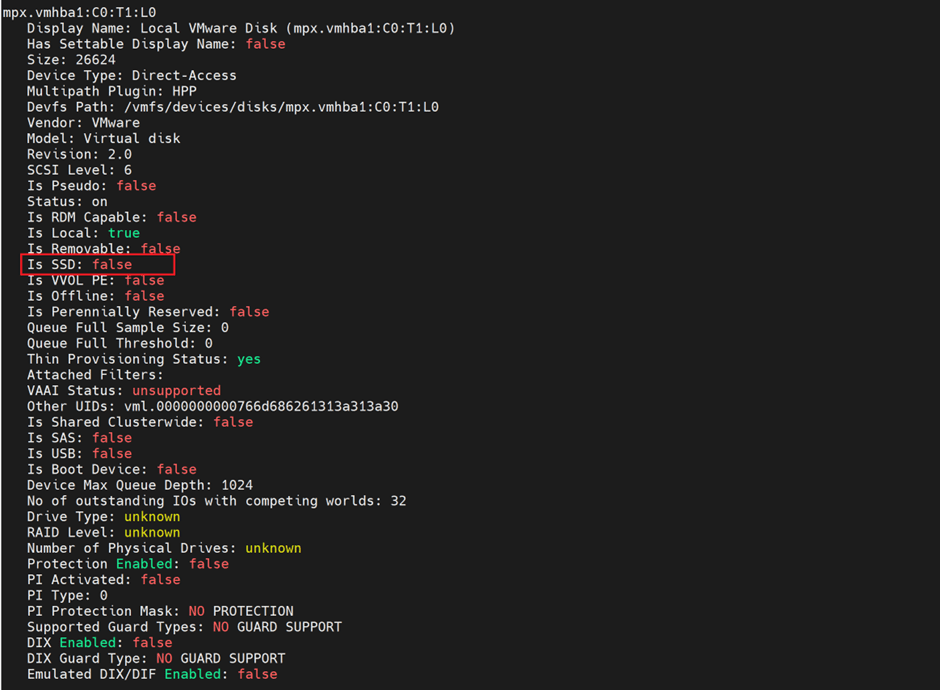
To mark it as SSD, I followed Williamlam’s blog :
But didn’t get sorted out
The reason is that themultipath plugin was hpp and not nmp , so the below fixed it
esxcli storage hpp device set -d mpx.vmhba1:C0:T1:L0 -M true –cfg-file
esxcli storage nmp satp rule add -s VMW_SATP_LOCAL -d mpx.vmhba1:C0:T1:L0 -o enable_ssd esxcli storage core claiming reclaim -d mpx.vmhba1:C0:T1:L0
https://communities.vmware.com/t5/ESXi-Discussions/Nested-ESXi-7-0-Mark-HDD-as-SSD/td-p/2866028

The below steps are followed after ESXi installation as per VCF deploy guide:
- Configure NTP on each host with the NTP server, and configured service to start/stop with host
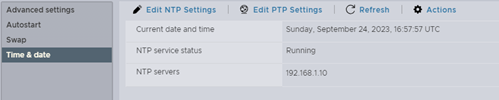
2. Start the ntpd service from Host–> Manage–>Service

3.Regenerate self signed certificates after modifying each hosts’ hostname
- Note here that the hostname needs to be input as hostname.fqdn and the suffix should be empty before regenerating the certificate

- The commands for regenerating the self signed certificate with the host name:
/sbin/generate-certificates /etc/init.d/hostd restart && /etc/init.d/vpxa restart
Deployment parameter sheet
Since this is a lab environment, there is no need to use 3 NSX managers, I’ll only use one and to do so, I modified the JSON file generated from the excel file of the deployment parameter sheet, in order to do so , we need to convert the excel to JSON and then modify the JSON:
- /opt/vmware/bringup/scripts/json-generator.sh my-vcf-deploy.xlsx my-vcf-deploy.json vcf-ems (The source file is the deployment parameter excel and the destination is the JSON file)
2.Modify the JSON to look like the below
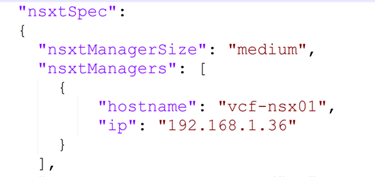
Deployment
Now, the final step, which is deploying the cloud builder VM and importing the modified JSON file (with one NSX Manager), I’ve all management IPs in the same subnet (192.168.1.0/24) with VLAN 0,
I faced this issue on reviewing the pre-requisites page
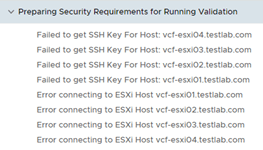
Failed to get SSH Key for Host
This is due to incorrect password configured in ESXi host, versus what was configured in the deployment parameter sheet, once this is configured, the verification passed except one issue

Which I ignored as this is a lab environment
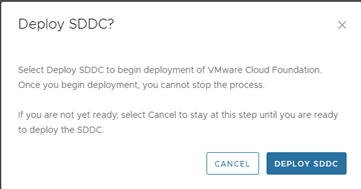
Now clicked on Deploy SDDC and left the deployment running,
After sometime, I faced the below errors:


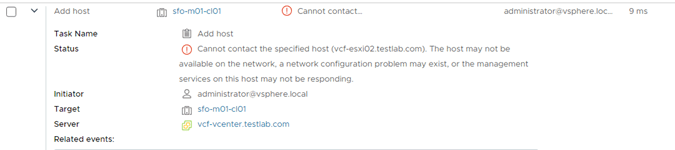
The log file where I checked the above error was :
/var/log/vmware/vcf/bringup/vcf-bringup-debug.log
I checked around and found out that from vCenter I can’t ping any of the 3 hosts, only the host where vCenter is deployed is reachable form vCenter,
Since originally I cloned 3 ESXi VMs from the first one, I suspected issue with UUID which I reset
Followed this and still was the same issue, so I re-installed the entire ESXi VMs and then the error was bypassed
Hit this error:

Apparently the time it takes for deploying NSX manager is more than the wait time from Cloud builder VM, so I suspended the cloud builder VM and waited till NSX manager loads
After NSX Manager loaded, I resumed the cloud builder VM

Finally the bring up was successful

References
 The SDN Blog